


 10/26/2026
  Steve Bearden
An annual report should explain what your organization accomplished, what the results mean, and where it plans to go next. It can cover performance over the previous 12 months while making the people and priorities behind the figures easy to understand. Knowing how to make your annual report engaging means shaping that information into a clear story, not simply assembling facts on a page.
Financial results and operational details matter, but readers need context to understand why. A concise opening summary, human stories, well-labeled visuals, and clear sections help investors, employees, donors, and other stakeholders find what they need without getting lost in dense copy. This guide covers practical ways to define your audience and purpose, build a cohesive narrative, explain complex information, and choose a reader-friendly format. The result is an accurate, informative annual report that gives people a reason to keep reading.
Key Takeaways
- Set a clear purpose for the report and shape impact stories around the people, mission, and outcomes readers need to understand.
- Choose print, digital, or a combination based on how your audiences will access the report and the experience you want to create.
- Use brand-consistent visuals to clarify results and give complex information a more human, memorable narrative.
- Make dense content easier to navigate with concise sections, meaningful headings, readable typography, and context for key figures.
What are annual reports for?
Annual reports explain an organization’s performance over the previous 12 months and outline plans for the coming financial year. They connect results to mission, helping readers understand what changed, why it matters, and what comes next.
Examples include WWF’s 2024 Tigers Alive Annual Report, which links to six articles about conservation efforts, partnerships, and milestones. AstraZeneca’s digital report is structured around five core themes.
- Build the story around your mission. Choose a central message that connects your organization’s priorities with its results. Then arrange sections so readers can follow the path from goals to action to outcomes. A nonprofit might link a program’s yearly goals to the communities it serves and the progress it made.
- Use specific examples to explain results. Pair a performance figure with a case study, anecdote, or project example that shows what it means in practice. For a nonprofit, distinguish activities from impact: describe what a program delivered, then explain how it affected people’s lives. This makes the data more meaningful without replacing it.
- Tell people’s stories with respect. Center real people and outcomes, and represent the communities served with authenticity. Give each story enough context to show the person’s agency, not only the organization’s role. Use accurate details and avoid reducing someone’s experience to a dramatic quote or a convenient proof point.
- Choose visuals that move the narrative forward. Use photographs to show the human side of the work, and charts to clarify trends or results. Clear labels help readers interpret data; consistent colors and typography help sections feel connected. Better Cotton’s Annual Report Key Highlights covers 2023-24, offering a named example of a report focused on key information.
- Shape each section for its audience. Investors may prioritize financial information, while employees may look for achievements and culture. Use a leadership message to summarize performance, challenges, and future goals, then give readers a concise opening summary. A coherent narrative makes the message easier to follow across the report.
The shift from print and PDFs to digital reports
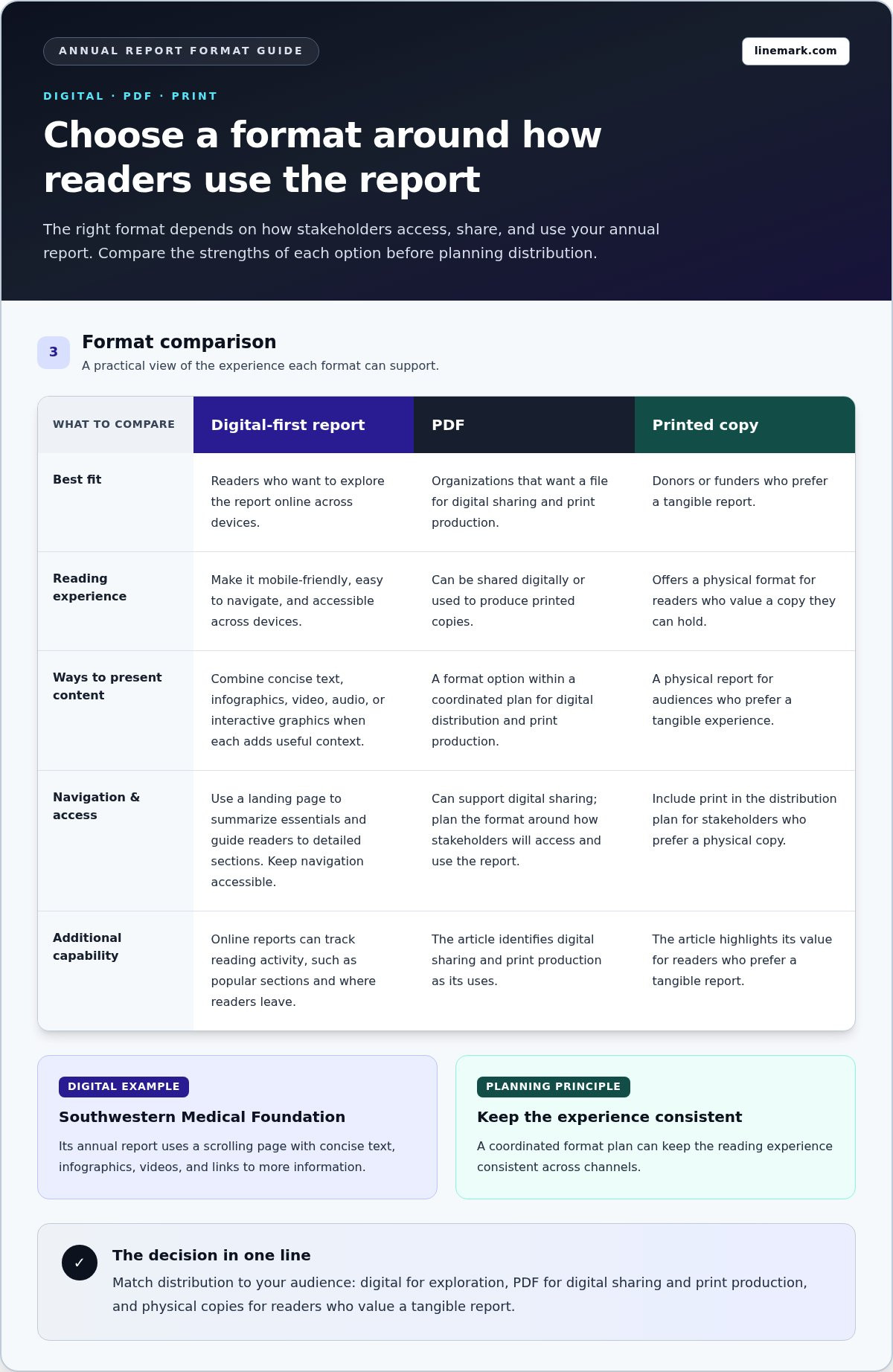
Choose a format based on how stakeholders will read, share, and use the report. A digital-first approach can make information easier to explore, while print works well for audiences who value a physical copy.
-
Adopt a Digital-First Format
Make the digital report mobile-friendly and easy to navigate across devices. Use a landing page to summarize the essentials and guide readers to detailed sections, rather than presenting everyone with one long document. Southwestern Medical Foundation’s annual report, for example, uses a scrolling page with concise text, infographics, videos, and links to more information. Keep navigation accessible so readers with disabilities can move through the content.
-
Add Multimedia to Digital Reports
Use video, animation, or audio when it adds context that text alone can’t provide. A short staff interview might explain a program, while video can show its work in context. Give each media element a clear purpose and concise caption. Don’t make essential information available only through video; readers should be able to find the key message in text, too. Subtle animation can guide attention without interrupting reading.
-
Include Interactive Digital Elements
Add clickable section links, maps, timelines, or interactive graphics so readers can explore at their own pace. Someone interested in financial performance can go straight to that section, while another reader may follow a program story. Label controls clearly and make them easy to use on a phone. Online reports can also track reading activity, such as popular sections and where readers leave, providing useful signals for future editions.
Match distribution to your audience. A PDF can support both digital sharing and print production, while physical copies can serve donors or funders who prefer a tangible report. A coordinated format plan can keep the reading experience consistent across channels. Plan your report format around how stakeholders will access and use it.
Using a visual narrative aligned with brand identity
Plan visuals as part of the report’s message, not as decoration added after the writing is done. Whether working in-house or consulting a creative specialist like Mark Finzel Art and Design, a consistent visual system helps readers connect stories and results with the organization’s identity.
-
Build a Visual Narrative
Sequence visuals to take readers from the organization’s priorities to its results. For example, pair a program story with a photograph, then show its outcome in a chart. Keep colors, fonts, and graphic styles consistent with the organization’s other materials. Each image should clarify a point or add context. Avoid visuals that compete with the message or imply results the text doesn’t support.
-
Use Data Visualizations, Maps, and Infographics
Match each visual to the information it needs to explain. Use a line chart to show change over time, a pie chart for distribution, or a map to show where programs operate. Add clear labels and enough context for readers to interpret the figures accurately. An infographic can replace 200 words with one scannable moment, but it still needs a clear takeaway. Use photographs to connect donors and supporters with the people behind the results.
-
Add Interactive Data Visualizations
Give readers interactive ways to explore complex results when the digital format allows. A clickable map can reveal program details by location, for example, while an interactive chart can let supporters focus on a particular trend. Keep the main message visible without requiring clicks, and label every control clearly. Use color and motion consistently with the brand, and ensure visuals remain understandable on a phone.
Clear layouts that make dense information easier to read
Gather financial, program, and impact information before designing the pages. If you’re asking how to make your annual report engaging, give readers a clear path from headline results to the details that support them.
-
Organize Financial Statements and Performance Information
Present financial statements in a consistent order, such as an income statement, balance sheet, cash flow statement, and explanatory notes. Include year-over-year comparisons and explain what changed so readers can interpret results in context. Open with a summary of achievements and priorities, then move to program outcomes and detailed financial information. Descriptive headings make it easier to find each section.
-
Make Complex Information Accessible
Translate specialized terms into plain language, then use a chart or concise example to explain the point. Nonprofits can connect program achievements with financial information and an impact story to show what happened and why it matters. Avoid crowded pages, unexplained abbreviations, and long blocks of copy. A text box or pull quote can highlight a finding without breaking the narrative. Clear hierarchy and plain-language explanations are practical ways to make your annual report engaging.
-
Check Accessibility and Readability
Use simple, readable fonts, descriptive headings, clear contrast, and enough white space. For a digital report, make navigation usable with assistive technology, and don’t rely on color alone to distinguish information. Keep each page scannable in 15 seconds, with one clear main point and meaningful labels. Review the report on a phone and in print before publishing.
Before release, check every page for clarity, context, and a useful reading path. Avoid tiny type, inconsistent layouts, unlabeled charts, and links that don’t explain their destination. That final review is another practical step in how to make your annual report engaging. Create a clear, reader-friendly annual report with a layout that presents dense information with precision.
Linemark: Custom Book Printing
Linemark turns completed annual reports into polished print pieces through Custom Book Printing and Commercial Printing. A physical edition can work well for meetings, donor presentations, or distribution alongside a digital report. The book format brings financial results, program stories, and visuals together in a cohesive presentation readers can revisit.
For a report that also needs broader distribution, Direct Mail can support delivery to selected audiences. Linemark’s printing capabilities can be part of a coordinated approach that keeps the report’s content and presentation aligned across formats. Share your annual report goals and production needs with Linemark. Contact Linemark to discuss your report.
Carry Your Report’s Story Forward
Your annual report can do more than close a reporting cycle. Use it to start the conversations and decisions that follow. Ask which message readers should remember, what action should come next, and how the report can support future communications. This forward-looking brief keeps production choices connected to a clear purpose.
A practical way to decide how to make your annual report engaging is to keep the audience’s next step in view, not just the publication date. If a print edition is part of the plan, Linemark’s Custom Book Printing, Direct Mail, and Large Format Graphics can support different ways of presenting and distributing organizational communications. Choose an approach that fits the report’s purpose and the readers it needs to reach.
When you’re ready to move from planning to production, contact Linemark to discuss your report. A clear purpose gives your next annual report a strong foundation and helps build a more meaningful connection with readers.
Frequently Asked Questions
How can I simplify financial data for readers?
Start by identifying the decision each financial figure helps readers understand. Replace internal accounting shorthand with familiar terms, and explain specialized labels in a brief note. For example, pair a change in operating expenses with its reason, such as a new program or higher material costs. Keep detailed figures in supporting notes so the main explanation stays focused.
What makes an annual report engaging and effective?
An effective report helps each audience find information relevant to its decisions. Before drafting, list the questions readers may have, such as whether goals were met or what priorities come next. Use those questions to shape section titles and transitions. Then review the report from a reader’s perspective: can someone unfamiliar with the organization understand its purpose, evidence, and next steps?
What storytelling techniques work well in annual reports?
Use a clear sequence: introduce a challenge, show the organization’s response, and explain the result. A brief case study can trace a project from planning through delivery, while a leadership message can connect it to broader priorities. Include enough context for readers to understand what changed. Don’t present one anecdote as proof of an organization-wide outcome.
How can you make annual report data and financial results easier to understand?
Explain what changed, what contributed to it, and why it matters to the organization’s plans. If a program reached more participants but required additional resources, for instance, describe both developments together. Add a note defining the measure and its scope. This gives readers a fair basis for interpretation and avoids making a figure seem more conclusive than it is.
What charts, infographics, and visuals should an engaging annual report include?
Choose each visual based on the comparison readers need to make. A bar chart can compare program categories, while a timeline can show a project’s progress through key stages. Use an infographic for a compact overview, and add source notes to clarify where its figures came from. Remove decorative elements that don’t help explain the information.
How can you use photos, quotes, and employee or customer stories in an annual report?
Choose images and quotes that add context to a specific achievement, and explain who is speaking and why their perspective matters. Get permission before using identifiable photos or personal stories, and let contributors review quotations for accuracy. Include employee perspectives on how work gets done or customer experiences that illustrate a service outcome, without implying that one account represents everyone.