

 10/25/2026
  Steve Bearden
Black isn’t mandatory: QR codes can scan in other colors when the code modules remain dark against a light background, with strong contrast of about 4:1. The best practices for QR codes on printed materials start with that contrast, then account for paper finish, code size, crisp artwork and scanning distance. A distinctive design only works if a phone can read it reliably.
You’ll learn how color and paper affect scanning, how to choose a code type, and how to test a printed proof across devices and lighting conditions. We’ll also cover quiet zones, placement, and layout choices that help prevent scanning problems. QR codes don’t expire on their own: a printed code remains usable while it’s physically readable and its linked destination stays active. These practical guidelines help you plan print materials that are easy to scan and ready for real-world use.
Key Takeaways
- Use a dark code on a light background and aim for strong contrast; color can work when the pattern stays easy to distinguish.
- Size the code for the distance people will scan it from, and leave enough space around it for phone cameras to detect its edges.
- Test a physical proof on at least three devices, including an older phone, and check for glare under different lighting.
- Choose a static code when its destination won’t change, or a dynamic code when you need to update the linked content without replacing the printed code.
- A QR code doesn’t expire on its own, but it remains useful only while the print is readable and its destination is active.
1. What Is the Best Paper for Printing QR Codes?
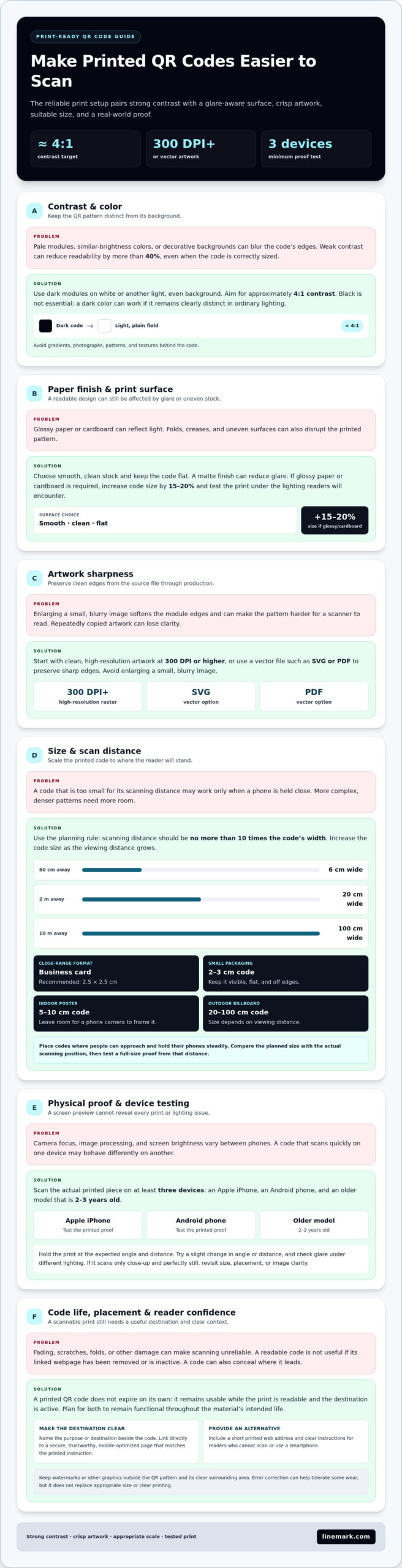
The safest setup is a dark QR code printed on a white or light-colored background. Aim for approximately 4:1 contrast between the code modules and background. High contrast is the leading scanning aid because phone cameras need a clear difference between the pattern and its surroundings. Insufficient color contrast can reduce readability by more than 40%, even when the code is correctly sized.
Black and white are a reliable combination, but black isn’t essential. Use a dark color against a pale, even background, then check that the contrast remains clear in ordinary lighting. Avoid pale modules on a dark field and colors with similar brightness. Gradients, patterns, photographs, and decorative textures behind the code can blur the boundary between the modules and the background. Keep the area behind the code plain.
Paper finish affects the result, too. Glossy paper or cardboard can reflect light and make a code harder to scan. If either material is required, increase the code size by 15-20% and test the printed result under the lighting where readers will encounter it. A matte finish can reduce glare. Smooth, clean stock also helps preserve crisp edges; folds, creases, or uneven surfaces can disrupt the pattern.
Print quality matters as much as the color choice. Prepare high-resolution artwork at 300 DPI or higher, or export it as a vector file such as SVG or PDF to preserve sharp edges. Avoid enlarging a small, blurry image to fit the design. The Centers for Disease Control and Prevention warns that copying a VIS from a photocopy increases the chance its barcode will be too blurry for a scanner. The same practical lesson applies: start with clean source artwork, not a repeatedly copied image.
What URL and landing page practices improve QR code scan success? Link directly to a mobile-optimized page that matches the printed call to action, such as a menu or offer. Use a secure, trustworthy destination, and make the instruction clear so readers know what they’ll see when they scan.
How do paper finish, ink, and printing quality affect QR code scanning? Glare from glossy finishes can interfere with camera reading, while weak contrast or soft edges can obscure the code pattern. Use dark ink on a light background, sharp, high-resolution artwork, and test a physical proof in the expected lighting.
What privacy, security, and accessibility risks should be considered when using QR codes in print? A code can conceal its destination, so name the destination or purpose beside it and use a secure, relevant landing page. Include a readable alternative, such as a short printed web address, and clear instructions for people who can’t scan or use a smartphone.
2. How long do QR codes last?
A printed QR code doesn’t expire on its own. It remains usable while the print is readable and its linked destination is active. Fading, scratches, folds, or other damage can make scanning unreliable; a removed or inactive webpage can leave a readable code with nowhere useful to go. Plan for both the printed surface and the destination to remain functional throughout the material’s intended life.
Size the code around the distance between the print and the person scanning it. A common planning rule is to keep scanning distance at no more than 10 times the code’s width. For example, a code scanned from 60 cm away should be at least 6 cm wide. At 2 m, plan for at least 20 cm; at 10 m, at least 100 cm. Greater distance requires a larger code, not simply a more prominent instruction.
For close-range use, match size to the format and how people hold it. A business card QR code is recommended at 2.5 × 2.5 cm. Choose a QR code size that is easy to scan from the distance at which readers will encounter it. More complex codes need more room, since their denser patterns are harder for cameras to distinguish at small sizes.
Placement should make scanning natural. On small product packaging, a 2–3 cm code can fit available space, but keep it visible and flat rather than bending it around an edge. Menus are typically scanned at the table, so leave enough clear area for a phone camera to frame the code. On posters, place the code where people can approach and hold their phones steadily. For indoor posters, a 5–10 cm code is suggested; outdoor billboards may need 20–100 cm, depending on viewing distance.
Adding a QR code watermark for document traceability calls for a separate design decision. Keep any watermark outside the QR pattern and its clear surrounding area, since graphics over the modules can obstruct scanning. When tracking copies matters, use a distinct printed identifier or mark elsewhere on the document. Error correction can help a code tolerate some wear, but it doesn’t replace an appropriate size or clear printing.
For posters and signs, large format graphics can bring the code into the right scale for its viewing distance. Before production, compare the planned size with the actual scanning position, then test a full-size proof from that distance. A code that scans only at close range won’t serve readers approaching from farther away.
3. Testing printed codes across devices and lighting conditions
A digital preview can’t reveal every issue in a finished print. Test a physical proof on at least three devices before approving production. Include an Apple iPhone, an Android phone, and an older model that is 2-3 years old. Camera focus, image processing, and screen brightness vary, so a code that opens quickly on one phone may behave differently on another.
Scan the actual printed piece, not an image on a monitor. Hold it at the angle and distance readers are likely to use, then try a slight change in angle or distance. If it scans only when the phone is held close and perfectly still, revisit the code’s placement, printed size, or image clarity before production.
Use a consistent test sequence to make results easy to compare:
- Scan the proof with each of the three devices and confirm the intended page opens.
- Use the phone’s camera and a QR code scanning app to compare scanning behavior.
- Repeat under bright, dim, and uneven lighting, including reflections on glossy stock.
- Check the landing page on each phone for readable text and usable buttons.
Lighting affects how clearly a camera captures the code. A reflection across glossy paper may hide part of the pattern, while dim conditions can slow focusing. Test the proof where people will scan it, such as on a restaurant table, in a brightly lit lobby, or in a shaded display area. Rotate the sample slightly to reveal glare that may not show under direct overhead lighting.
Check the destination as well as the scan. A successful camera read is useful only if the page loads correctly and supports the printed call to action. Test each version separately when different mailers or flyers lead to different offers. For example, confirm that a campaign-specific flyer opens its matching page, not a general site page.
Scan analytics can help assess campaign engagement, but scan totals alone don’t explain user behavior. Compare activity with the intended outcome, such as viewing information or completing a form. A small pilot print can reveal problems before wider distribution. Record the device, lighting, finish, and result for each test. Best practices for QR codes on printed materials include reviewing these notes and correcting the source artwork before final approval. They also mean evaluating scans against the campaign goal, not just whether the code is recognized.
4. Should you print a static or dynamic QR Code?
Choose a static QR code when the destination will stay fixed, such as a printed contact page. A static code can’t be edited after creation, so a destination change requires creating and printing a new code. Dynamic QR codes can let you update the linked URL or content without changing the printed code. That flexibility can suit a campaign whose offer or landing page may change after production.
Dynamic QR codes often include analytics for tracking engagement and campaign effectiveness. Before choosing one, decide whether the printed material needs a fixed destination or the option to revise it later. For example, a brochure for a single event may point to one event page, while a reusable product insert may benefit from a destination that can change as product information evolves.
Error correction helps a QR code remain readable when part of its pattern is damaged or obscured. QR codes have four levels: L, M, Q, and H. Their respective recovery capacities are 7%, 15%, 25%, and 30% of data. Higher levels can help codes remain scannable when slightly worn, but they don’t replace sound printing, suitable sizing, or testing on the physical proof.
Match the correction level to the print conditions. A clean indoor flyer may not need the same level as a code exposed to handling or outdoor wear. For outdoor vinyl or plastic, the recommended level is H. Higher correction can help when a logo is included, but branding must not interfere with the code’s pattern. Place the logo so it doesn’t cover so much of the code that a phone camera can’t read it.
Data density matters, too. A QR code carrying a long URL or extensive information has a more complex pattern than one carrying a short destination. If the design includes a logo or the code may be exposed to wear, keep it large and clear enough for its intended use. Avoid encoding extra information when a concise destination serves the same purpose. A short URL can reduce pattern complexity and improve readability in a compact layout.
Use this decision process before printing:
- Choose static when the destination is settled and won’t need edits.
- Choose dynamic when the printed code must continue working with an updated destination.
- Select error correction based on expected wear, logo use, and the physical environment.
- Test the final artwork, including its quiet zone, after printing and before approving the run.
With either code type, keep the quiet zone clear and test the finished print. A dynamic destination can change, but it can’t fix a damaged code or unclear layout. Choose a code type that suits both its digital purpose and the print’s physical lifespan.
5. Quiet zones and distortion prevention
A QR code needs a clear border so a phone camera can distinguish its pattern from nearby print. This blank margin is called the quiet zone, and it should measure at least 4 modules wide around the code’s perimeter. A module is one small square in the pattern. If text, a border, or another graphic enters that margin, the camera may struggle to identify where the code begins.
Protect the quiet zone in the full layout, not just in the QR artwork file. A headline, price, decorative rule, or page edge can crowd the code once the design is placed. For example, leave the margin clear when positioning a code beside a book chapter summary or product description. Check the final trim area, too, so cutting won’t remove part of the code or its surrounding space.
Placement affects how well the printed pattern holds its shape. Keep QR codes away from folds, creases, and material edges. A code crossing a brochure fold can bend its modules, while a code close to a package seam may wrap around a curved surface. Place it on a flat panel, with the whole pattern facing the scanner. Curved surfaces can distort the image and interfere with scanning.
Custom layouts can include color, logos, and surrounding design elements as long as the code itself remains clear. Keep added graphics outside the quiet zone, and don’t place text or a logo across the modules. A frame can draw attention, but it shouldn’t merge with the code’s edge. Preserve a light, uncluttered margin so the camera can distinguish the code from nearby elements.
Before approving the artwork, inspect the placement at actual print size. Look for these common layout conflicts:
- Text, rules, or icons entering the 4-module quiet zone.
- A code positioned across a fold, crease, or curved package surface.
- Trim marks or page edges crowding the code’s clear margin.
- A logo or decorative element covering modules or breaking the code’s outline.
A dynamic QR code can point to an updated destination, but changing its digital link won’t correct physical distortion. Keep the printed code’s geometry intact and its margin clear through every design revision. If a new headline or call to action shifts nearby elements, review the spacing before releasing the file.
For a book layout with a scannable code, plan your custom book printing with the quiet zone and placement built into the page design. A clear margin, a flat location, and undistorted modules help the code function as intended.
Linemark: Custom Book Printing
Linemark can incorporate QR codes into printed books and other commercial materials through Custom Book Printing and Commercial Printing. If your book includes scannable links, plan the code’s size, quiet zone, and placement with the page layout so it remains clear in the finished piece. For campaigns across multiple formats, Direct Mail and Large Format Graphics can extend the same reader journey to mailers or signage.
Prepare the destination and final QR artwork before production, then test a physical proof at its intended size. This connects the digital action with the printed experience and helps catch layout issues before distribution. Contact Linemark to discuss your print project or visit linemark.com.
Make the Printed Experience Part of the Plan
A QR code works best as part of a larger communication journey. Before finalizing the artwork, decide who will maintain its destination and what readers should do after they arrive. Clear ownership helps keep the digital experience aligned with the printed piece as campaign priorities evolve. Best practices for QR codes on printed materials mean planning this connection alongside the design, not leaving it until the final proof.
Think beyond the individual code, too. A book, mailer, or sign may be one of several places where people encounter the same campaign. Consistent messaging across these touchpoints clarifies the next action and supports a coordinated experience. Linemark can bring print projects together around your communication goals.
Contact Linemark about your print project, and take the next step toward a connected print experience.
Frequently Asked Questions
Is it possible to print a QR code in a color other than black?
Yes, a QR code can use colors other than black if its pattern stays clearly darker than a light background. Aim for approximately 4:1 contrast between the modules and background. For example, deep blue on white can work, while pale blue on gray may be difficult to scan. Check the color combination in the actual printed design, since nearby artwork or lighting can affect how distinct the pattern appears.
What Is the Best Paper for Printing QR Codes?
Choose a smooth, light-colored paper that keeps the code’s edges crisp and offers a clear background. A matte finish can help avoid reflections, especially on menus or handouts used under overhead lighting. Glossy paper or cardboard can create glare, so increase the code size by 15-20% if those materials are required. For a brochure, test the stock with its final ink and finish before approving the complete print run.
How long do QR codes last?
A QR code has no built-in expiration date. It can keep working as long as the printed pattern remains readable and the linked destination stays active. For a seasonal promotion, decide who will maintain the page after the campaign ends. If the printed piece may circulate longer, choose a destination that remains relevant or provide a clear alternative way to find current information.
How to Enhance User Experience With QR codes?
Tell readers what they’ll get before they scan, with a direct instruction such as “Scan to view the event schedule.” Make the destination useful on a phone by focusing the page on the promised action and avoiding unnecessary steps. If the code opens a registration page, for example, place the event details and registration option near the top so readers can act without searching through unrelated content.
Should You Add a Logo to a QR Code?
You can add a logo, but it must not interfere with the code’s pattern. Keep it small, preserve the clear margin around the code, and test the finished print on multiple phones. Higher error correction can help a code with a logo remain scannable, but it doesn’t replace clear artwork. If the logo obscures modules or prevents reliable testing, place it beside the code instead.
Should you print a static or dynamic QR Code?
Choose a static code for a destination that won’t need to change, such as a permanent contact page. Choose a dynamic QR code if you may need to update the destination after printing. For example, printed event materials can link to a current schedule through a changeable destination. Decide who will manage that destination over time, since a dynamic code still depends on the linked page remaining available.
What Makes a QR Code Easy to Scan?
A code is easier to scan when its modules are distinct, its artwork is sharp, and the camera can capture it without glare or obstruction. Keep the code flat and fully visible, with a size suited to the reader’s position. A small code on a poster viewed from farther away can be hard to frame. Test it from the distance people will actually approach and scan.
What are the best practices for designing effective QR code codes?
Start with a clear destination and concise instruction, then keep the visual design focused on the code’s function. Prepare high-resolution artwork at 300 DPI or use a vector format such as SVG or PDF. Keep logos and decorative elements clear of the pattern and quiet zone. Finally, scan the physical proof on different phones and confirm that the destination delivers the action promised in the printed message.