


 10/06/2026
  Steve Bearden
Nearly 2 billion pieces of First-Class Mail were marked “undeliverable as addressed” in fiscal year 2024, according to the USPS. For marketers, address problems can waste print, postage, and staff effort. Knowing how to avoid undeliverable mail starts before production, with a repeatable process for catching incomplete, outdated, duplicated, or inconsistent data.
A one-time list cleanup won’t prevent every problem. Addresses change, new records enter databases, and formatting errors can slip into campaign files. Build checks into campaign preparation, then use returned-mail information to improve the next mailing.
This guide covers common reasons mail is returned and practical steps for checking addresses, updating lists, and handling exceptions. It also explains how to coordinate data preparation with printing and fulfillment so more pieces are ready to reach their intended recipients.
Key Takeaways
- Build address checks into campaign preparation so problems are caught before the mailing file moves to print.
- Standardize, validate, deduplicate, and review addresses in a consistent sequence. Check source records for missing or conflicting details.
- Know what each list-quality check can flag, and where manual review or follow-up may still be needed.
- Assign owners for exception review, list approval, and returned-mail updates so address-quality work is repeatable.
- Learn how to avoid undeliverable mail by coordinating data preparation with personalized production, fulfillment, and distribution.
How to Avoid Undeliverable Mail by Understanding Why It Gets Returned
Undeliverable mail is a piece that can’t reach its intended delivery address. Missing apartment details, an incorrect street number, an outdated address, or information that’s difficult to read can all interfere with delivery. A database entry may look plausible and still be incomplete or inaccurate, so understanding how to avoid undeliverable mail begins with checking the details behind each record.
A delivery delay isn’t the same as a return. Mail may take longer to arrive, be forwarded after a recipient moves, or reach someone other than the intended recipient. Address hygiene can reduce preventable errors, but it can’t guarantee delivery. Some outcomes depend on circumstances beyond the mailing file.
For a quick overview of what may happen when delivery fails, watch this video:
What address problems commonly make mail undeliverable?
Small gaps in an address can have practical consequences. Without an apartment or suite number, a carrier may not have enough information to identify the destination. An incorrect street name or number can point to a different location, while an incomplete ZIP Code can complicate routing. Typos, inconsistent abbreviations, and uneven formatting can also make records harder to process reliably.
Moves create another common risk: an address that was once valid may no longer be current. USPS change-of-address records can help identify some moves, but not every address change is necessarily reflected there. Tools such as the Coding Accuracy Support System (CASS) can help standardize address elements. They don’t replace checking source records for missing or conflicting details.
What can a returned-mail notice tell you?
Return markings or endorsements may offer clues about why a piece couldn’t be delivered, such as an address issue or a recipient who has moved. The information shown can vary with the mail service and the instructions on the piece, so interpret each marking in context rather than treating one code as universal.
Make returned-mail tracking part of campaign recordkeeping. Log the recipient record, campaign, return date, and reason shown, using consistent categories your team can review. Patterns can help distinguish an isolated data-entry mistake from a recurring source-list issue. Address hygiene reduces avoidable risk, but can’t resolve every delivery exception.
How to Check Mailing Addresses Before Printing
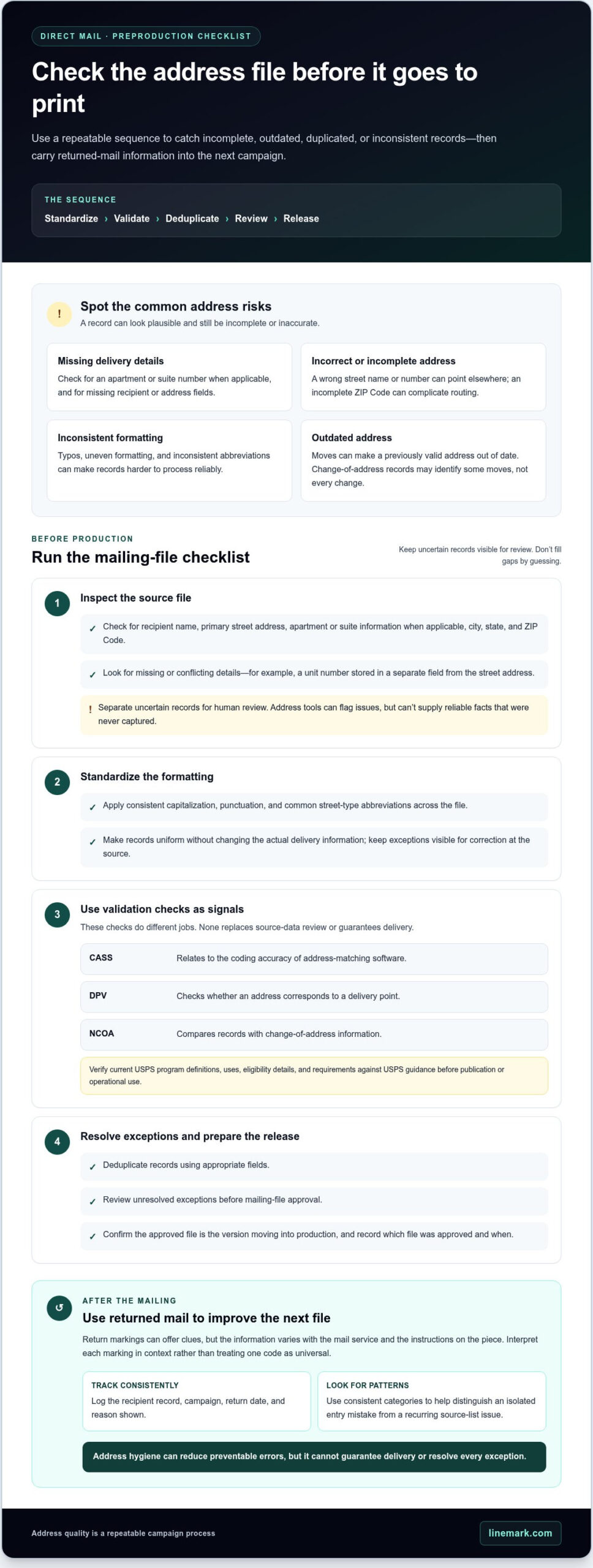
Make address review a defined preproduction checkpoint, not a last-minute fix. Use a practical sequence: standardize, validate, deduplicate, review, then release. Each step addresses a different risk, and the final review gives your team time to resolve questionable records before they become printed pieces.
Start with the source file. Look for missing or conflicting delivery details before automated processing. For example, a street address in one field and a unit number buried in another may need attention before the data can be interpreted consistently. Address tools can flag issues, but they can’t supply reliable facts that were never captured. Separate uncertain records for human review rather than filling in blanks or guessing.
Which address details should teams review first?
Check that each record includes the recipient name, primary street address, apartment or suite information when applicable, city, state, and ZIP Code. Then apply consistent formatting across the file, including capitalization, punctuation, and common street-type abbreviations. Standardization should make records uniform without changing the actual delivery information. Keep exceptions visible so they can be corrected at the source.
How do CASS, DPV, and NCOA fit into address hygiene?
These terms describe distinct address-quality functions, not one all-purpose check. At a high level, CASS relates to the coding accuracy of address-matching software, DPV checks whether an address corresponds to a delivery point, and NCOA processing compares records with change-of-address information. Verify current USPS program definitions, uses, eligibility details, and requirements against USPS guidance before publication or operational use.
Use results as signals for review. A standardized address may still contain an incorrect unit number, and a deliverable location may no longer be current for a particular recipient. Keep source-data checks in the workflow, and don’t treat a successful tool result as a guarantee of delivery.
Before releasing the mailing file, deduplicate records using appropriate fields, review unresolved exceptions, and confirm that the approved version is the one moving into production. Record which file was approved and when, so data preparation and print production stay aligned. This checkpoint is central to how to avoid undeliverable mail without relying on a single tool or cleanup pass.
For campaigns that need coordinated list preparation and production, Linemark’s direct mail support connects mailing-list management and data processing with the next steps in the workflow.
Which Mail-List Checks Matter Most for Preventing Returns?
No single list check catches every issue. Each serves a different purpose, so a dependable process combines automated checks with human review of exceptions. Choose the mix and frequency based on how often the list changes, how frequently campaigns are mailed, and how reliable the source data is.
| Check | Can flag | Cannot resolve by itself |
|---|---|---|
| Manual review | Missing details, conflicting fields, and exceptions requiring context | Large files quickly or consistently without clear review rules |
| Address standardization | Inconsistent formatting and recognizable address variations | Whether the source information is complete or accurate |
| Address validation | Potentially invalid or non-matching address details | Whether the named recipient currently receives mail there |
| Deduplication | Records that match defined duplicate criteria | Whether two similar records represent separate intended recipients |
| Move-related updates | Some records that may have changed after a recipient moved | Address changes absent from the data being checked |
When is a manual review useful, and when does it fall short?
Manual review is most useful for records flagged by automated checks, incomplete entries, and cases that require business-specific context. A reviewer may distinguish a separate recipient from a likely duplicate or identify which source record needs correction. But hand-checking a large file takes time, and reviewers may handle similar exceptions differently. Document formatting standards, review steps, and reasons for retaining or changing a record.
How should you handle duplicates and uncertain address matches?
Set duplicate criteria before cleaning the file. Depending on campaign rules, a match might require the same recipient and address, while a household mailing may intentionally include multiple recipients at one location. Don’t delete a record based on a partial match alone. Send uncertain matches to a review queue, and log the decision and its source so the team can trace corrections and preserve useful information.
Schedule checks around actual list activity. A frequently refreshed database or a campaign drawing from multiple sources may need review at intake and before each mailing. A stable list used less often may need a different cadence, with a fresh review before production. Reassess the schedule when source systems, campaign frequency, or return patterns change.
A measured combination of checks is a practical way to improve how to avoid undeliverable mail while protecting valid records. Use automation for repeatable screening, people for ambiguous cases, and consistent documentation to carry decisions forward from one campaign to the next.
Build a Process to Reduce Undeliverable Mail
Address quality works best as a campaign-wide control, with clear handoffs from list intake through mailing. Assign an owner at each stage so flagged records don’t disappear between data preparation and production. The goal is a repeatable process that catches issues early, documents decisions, and helps teams learn from returns, not a promise that every piece will be delivered.
What should a pre-mailing checklist include?
Before processing begins, confirm the list source, campaign audience, required address fields, and current file version. Check that validation results have been reviewed, duplicate rules have been applied, and uncertain records are resolved or held aside. A designated reviewer should approve the final data file before personalization or printing starts.
- List intake: Record the source, campaign purpose, and person responsible for the submitted file.
- Data processing: Review flagged addresses, duplicates, and records set aside for manual review.
- Proof approval: Confirm that personalization fields and recipient data correspond to the approved file.
- Production and mailing handoff: Identify the final approved version and pass it forward with relevant processing notes.
Track the total records received and released, duplicates identified, addresses flagged, records held for review, and pieces later returned. Assign specific owners for exception review, final list approval, and updates based on returned mail. Consistent counts make it easier to investigate discrepancies between stages and understand where issues surfaced.
How can returned mail improve the next campaign?
Connect each returned piece to its campaign and source record, then log the reason shown on the return notice. Update an address only when reliable information supports the change and the review is documented. If the cause is unclear, keep the record flagged for follow-up rather than treating an assumption as a verified correction.
Review return patterns after a campaign. Repeated missing unit details may point to a gap in list intake; recurring formatting problems may call for clearer processing rules. Use those findings to adjust source-data requirements, maintenance routines, and review thresholds. Set check frequency according to how often records change, campaign cadence, and source reliability. A new or frequently updated list may need attention at intake and again before release; other schedules can match the list’s actual change rate.
For marketers learning how to avoid undeliverable mail, a documented workflow makes responsibility clear from data preparation to mailing handoff. Linemark’s direct mail capabilities bring mailing-list management, data processing, print production, and fulfillment into a coordinated campaign workflow.
How Linemark Connects Address Preparation with Direct Mail Production
Address preparation and print production are linked stages of a direct-mail project. If the approved recipient file and production instructions aren’t aligned, errors can carry into personalization, fulfillment, and mailing. Linemark brings mailing-list management and data processing together with direct-mail production, creating a coordinated workflow for teams preparing complex or high-volume campaigns.
What changes when data and production workflows are coordinated?
Clear handoffs help keep the right file, instructions, and campaign details together. For example, confirming which recipient data is approved before a job enters production can reduce the risk of using an outdated file or mismatching records with personalization instructions. It also gives campaign, data, and production teams a shared point of reference when questions arise.
Variable data printing uses recipient-specific information to personalize printed pieces, so the quality and organization of campaign data matter. Names, addresses, and other approved fields need to be associated with the intended records and production requirements. Linemark connects data processing with print production, while fulfillment and nationwide distribution support later stages of the project. These coordinated steps help teams manage work consistently, but can’t guarantee delivery or a particular return rate.
How can a mailing partner support a consistent process?
A partner involved across multiple stages can help marketing teams coordinate details that might otherwise pass through separate workflows. Linemark provides direct mail, mailing-list management, data processing, print production, fulfillment, and nationwide distribution. Together, these capabilities support a connected path from campaign data preparation to producing and distributing personalized mail.
Start with the campaign requirements: the audience, available address data, personalization fields, print specifications, and fulfillment needs. Sharing those details early helps align the work and clarify how the data file connects to production and mailing instructions. Linemark can coordinate its direct-mail capabilities around project requirements, connecting the workflow from data preparation to distribution.
For marketers considering how to avoid undeliverable mail, coordination creates a clearer operational path by connecting address preparation to the materials and processes that follow. Learn more about Linemark’s direct mail services.
Make Address Quality Part of Every Campaign
Reducing returned mail starts with a repeatable process, not a one-time cleanup. Standardize and validate records, review duplicates and uncertain matches carefully, then approve the final file before production. Track returned pieces and use documented reasons to improve future list intake and review steps.
That’s the practical foundation for how to avoid undeliverable mail: connect accurate data preparation with clear handoffs into personalization, print production, fulfillment, and mailing. No workflow can guarantee delivery, but consistent controls help teams catch avoidable address issues before they become printed pieces.
Linemark brings mailing-list management, data processing, print production, and fulfillment together to support print and communications projects. Discuss your direct-mail project with Linemark to talk through your campaign requirements and workflow.
Frequently Asked Questions
How do I avoid undeliverable mail?
A repeatable address-quality process is the best starting point for how to avoid undeliverable mail. Check source records for missing or conflicting details, standardize address formatting, validate addresses, review potential duplicates, and separate uncertain records for follow-up. Approve the final mailing file before personalization and printing begin. After mailing, record return reasons and use reliable information to update records and improve the next campaign.
What are the most common reasons mail is returned as undeliverable?
Mail is commonly returned because an address is incomplete, inaccurate, outdated, or difficult to read. A missing apartment number, for example, may prevent delivery within a building, while an incorrect street number can direct a piece to the wrong location. A recipient may also have moved. Review return markings to help identify the stated issue, keeping in mind that reasons and terminology may vary by piece and mailing instructions.
Can address validation guarantee that a piece of mail will be delivered?
No. Address validation can flag certain address problems, but it can’t guarantee that a piece will reach its intended recipient. A record may match a deliverable location while having outdated recipient information, or the recipient may move after the list is checked. Use validation alongside source-data review, careful handling of exceptions, and an approved-file checkpoint. These steps reduce preventable errors without controlling every delivery outcome.
How often should a business clean its mailing list?
Set the cleaning schedule according to how often the list changes, how frequently campaigns are mailed, and how dependable the data sources are. Review new or refreshed records as they enter the workflow, and check the mailing file before each campaign moves to production. After mailing, record and assess returned pieces. If source systems, campaign cadence, or return patterns change, revisit the schedule and review rules.
What is the difference between CASS, DPV, and NCOA?
CASS, DPV, and NCOA support different address-quality tasks. CASS, or Coding Accuracy Support System, relates to the coding accuracy of address-matching software. DPV, or Delivery Point Validation, checks whether an address corresponds to a delivery point. NCOA, or National Change of Address, uses change-of-address information to help identify records that may need updating. Their results support list hygiene, but none guarantees delivery to a specific recipient.
Should I remove every address flagged as invalid from a mailing list?
No. A flagged record may need correction or further review, not automatic deletion. Check the source information and determine whether the issue is a missing unit number, a formatting problem, a possible duplicate, or an address that needs confirmation. Keep uncertain matches in a review queue, and document decisions and changes. This helps protect valid records while preventing unresolved exceptions from moving unnoticed into production.
What should I do when direct mail is returned to sender?
Record the returned piece, campaign, source record, and reason shown on the mailpiece or notice. Review the stated reason in context, since markings and handling can vary. Update the address only when reliable information supports the change, and document what was changed and why. If the cause is unclear, flag the record for review rather than guessing. Use return patterns to refine future list intake and maintenance.