

 11/06/2026
 Steve Bearden
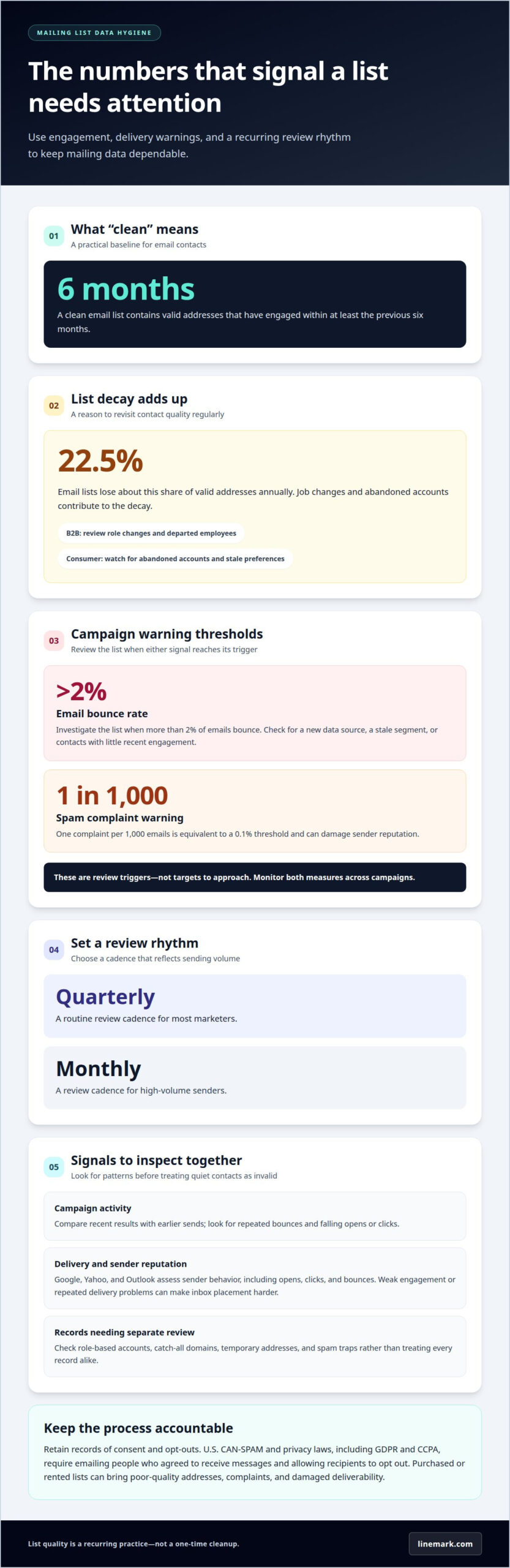
A large mailing list isn’t automatically a useful one. Data hygiene for mailing lists means standardizing postal addresses, correcting email syntax, removing duplicate records, and separating valid, engaged contacts from outdated or inactive ones. For email, a clean list includes valid addresses that have engaged within at least the previous 6 months.
Small data errors can accumulate across a mailing list, especially when records come from different forms, systems, or campaigns. A consistent process helps standardize records before use, while validation tools can flag address issues for review. This guide explains what clean mailing list data looks like and walks through practical steps to standardize postal addresses, correct common email errors, find duplicates, and assess hygiene tools. You’ll have a clearer process for preparing data for your next campaign.
Key Takeaways
- Use bounce activity, engagement patterns, and inconsistent records as signals to review list quality before a campaign.
- Apply consistent postal formatting and validation so mailing records are easier to process and more dependable for delivery.
- Set clear matching rules to distinguish true duplicates from separate contacts who share similar details.
- Choose hygiene tools based on the data they assess and how their results fit into your campaign workflow.
What Is A “Clean” Email List?
A clean email list contains valid addresses and contacts who engaged within at least the previous 6 months. Use these steps to spot decay, protect sender reputation, and set a maintenance rhythm.
-
Spot Signs of List Decay
Compare recent campaign results with earlier sends, then isolate repeated bounces, falling opens or clicks, and outdated details. Email lists lose about 22.5% of valid addresses annually. Job changes and abandoned accounts contribute to that decay. For B2B marketing, review role changes and departed employees; for consumer lists, watch for abandoned accounts and stale preferences. Investigate sudden changes before treating quiet subscribers as invalid.
-
Assess Reputation and Delivery Effects
Review engagement and delivery signals together before sending another campaign. Providers such as Google, Yahoo, and Outlook assess sender behavior, including opens, clicks, and bounces. Repeated delivery problems or weak engagement can undermine sender reputation and make inbox placement harder. List hygiene also means identifying role-based accounts, catch-all domains, and temporary addresses for separate review. Spam traps, including addresses created to identify negligent sending practices, can signal that a list needs attention.
-
Review Bounce and Complaint Rates
Investigate your list when more than 2% of emails bounce. Treat one spam complaint per 1,000 emails, equivalent to a 0.1% threshold, as a warning that can damage sender reputation. These figures are review triggers, not targets to approach. Check whether a spike follows a new data source, a stale segment, or a campaign sent to contacts with little recent engagement. Keep monitoring both measures across campaigns.
-
Review Management Requirements and List Risks
Set a recurring cleaning schedule and retain records of consent and opt-outs. U.S. CAN-SPAM and privacy laws, including GDPR and CCPA, require emailing people who agreed to receive messages and allowing recipients to opt out. Quarterly reviews give most marketers a routine; high-volume senders can review monthly. Purchased or rented lists can bring poor-quality addresses, complaints, and damaged deliverability. Review B2B contacts for job changes and consumer contacts for abandoned accounts.
Mailing address standardization and validation
Identify invalid, duplicate, and inactive email addresses by combining validation results, campaign activity, and duplicate matching. Correct clear syntax errors, suppress invalid addresses, and review inactive subscribers before sending to them again.
-
Standardize Mailing Address Records
Use consistent fields for each record, including street, unit, city, state, and ZIP code. Apply the same formatting rules to forms and imported files so campaign data can be processed consistently. For U.S. direct mail, CASS-certified standardization matches mailing files to USPS formatting and supports requirements for bulk postal discounts. Keep apartment or suite details in the appropriate field rather than omitting them.
-
Validate Address Entries
Run postal records through address validation before sending a campaign. USPS ZIP+4 and DSF2 are services used to improve delivery accuracy. U.S. mailing address hygiene can also use CASS, DSF2, LACSLINK, and NCOALINK services. Use the results to distinguish records that need correction from those that should be suppressed. Keep the original record available during review so valid details aren’t lost through automated changes.
-
Flag Role-Based, Mistyped, and Duplicate Records
Review email addresses separately from postal records. Flag shared role accounts, such as info@ or sales@, for assessment rather than treating them as individual subscribers. Check for common typing errors at signup, such as “gnail.com” instead of “gmail.com,” and correct them only when the intended address is clear. Match records using email and other consistent identifiers, then merge confirmed duplicates without losing useful history.
-
Suppress Invalid and Outdated Addresses
Suppress hard-bounced and invalid email addresses from future campaigns. Repeated attempts won’t fix an address that cannot receive mail. Keep a suppression record so the address isn’t accidentally re-added through another import. For postal files, use validation results to correct outdated details where possible, then remove records that remain undeliverable. Review inactive subscribers using engagement history, and separate them from contacts who continue to respond.
Duplicate removal and syntax correction
Clean an email list by checking syntax, matching duplicate records, reviewing delivery results, and validating addresses before sending. Remove confirmed duplicates and hard bounces, and assess inactive subscribers in light of their engagement and your audience.
-
Remove Duplicate Records
Match records using normalized email addresses, then compare names and other available identifiers. A duplicate may appear when one subscriber uses the same address across signup forms or campaign imports. Preserve the record with the most complete history and merge useful details instead of deleting them blindly. Treat shared addresses carefully: two people may use one household email, so confirm identity before combining their records. Consistent matching protects deliverability without unnecessarily shrinking the audience.
-
Remove Hard Bounces
Review delivery reports after each campaign and suppress addresses marked as hard bounces. A hard bounce means the message could not be delivered, often because the address is invalid or the domain cannot receive it. Don’t keep sending to that address in the hope that it will recover. Check for a clear typing error in the username or domain before suppressing it, and correct the address only when the intended one is unambiguous. Keep suppression data available during future imports.
-
Remove Subscribers Incrementally
Separate inactive subscribers from invalid addresses before cleaning a larger segment. Use opens, clicks, and recent campaign history to identify people who may no longer engage. An inactive contact isn’t necessarily an invalid address, so consider a re-engagement message before removing that subscriber. For a weekly sender, 90 days without opens or clicks can indicate likely disengagement. Review the results before each cleaning cycle, then suppress persistent nonresponders to support sender reputation.
Data hygiene tools and providers
Build data hygiene for mailing lists around the records you need to assess and the decisions each result should inform. A well-defined workflow separates automated checks from contacts that need human review.
- Match the tool to the data. Use address-standardization tools for postal records, syntax checks for email formatting, and duplicate matching for overlapping contacts. Mailbox verification checks whether an email address exists without sending a message. These functions address different problems, so a single “clean” status may not tell you whether an address is deliverable, correctly formatted, or duplicated.
- Review results before applying changes. Look for clear labels such as valid, invalid, duplicate, or review needed. A catch-all domain may accept messages without confirming a specific mailbox, so don’t treat that result as verification of an individual address. Preserve original records and send uncertain matches for review instead of automatically deleting contacts.
- Fit the process to your platform and sending practices. Determine how a tool transfers records, returns results, and updates suppression files. Test a small sample that includes a mistyped domain, a hard bounce, duplicate contacts, and an outdated postal address. Confirm that each result maps correctly to your platform before processing the full audience. This makes data hygiene for mailing lists more consistent across systems.
- Assess providers by workflow, not just features. Compare the data types handled, level of detail in results, review controls, and ease of applying corrections. Check whether the workflow preserves source records and distinguishes active subscribers from invalid addresses. Document decisions so later cleaning cycles follow consistent practices and don’t restore suppressed contacts through another import.
With data review and campaign preparation aligned, plan your next mailing campaign around cleaner, more usable contact records.
Linemark: Direct Mail
Linemark helps turn standardized mailing records into coordinated Direct Mail campaigns. Once addresses are cleaned and duplicates resolved, your team can prepare a more consistent mailing file for production. Variable Data Printing can tailor printed pieces using information from your records, making accurate, well-organized data especially useful for personalized mail.
Bring Linemark into the process when your organization is ready to move from list maintenance to a physical campaign. Clear records help align audience selections with the mailing materials being produced, while a unified workflow supports campaign planning. Contact Linemark to discuss your Direct Mail project and how it can support your communication goals.
Build Data Quality Into Your Next Campaign
Make data hygiene for mailing lists part of your campaign workflow, not a cleanup task reserved for the day before a send. Assign responsibility for maintaining master records, documenting corrections, and applying suppression decisions consistently across imports. This gives each team a clearer handoff as audience information moves from collection to production.
With reliable records in place, consider how the format supports your communication goal. Linemark offers Direct Mail, Custom Book Printing, and Large Format Graphics, giving organizations options for reaching audiences through coordinated print materials. The right production approach depends on what you need to communicate and how the materials will be used.
Start planning your next mailing with a clear view of your data and campaign needs. Contact Linemark to discuss your mailing list and take the next step with confidence.
Frequently Asked Questions
What is list hygiene?
List hygiene is the ongoing process of keeping contact records usable for communications. It includes reviewing engagement, correcting errors, merging confirmed duplicates, and removing addresses that should no longer receive messages. For example, after importing event registrations, separate people who opted in from records collected for another purpose. This keeps the campaign audience organized and helps prevent old or unsuitable contacts from affecting future sends.
What Is Data Hygiene & How Is It Different from Data Verification?
Data hygiene is the broader practice of maintaining accurate, consistent records over time. Data verification is one part of that process: it checks whether a detail, such as an email or postal address, appears valid. Verification may flag a malformed email, while hygiene also addresses duplicate profiles, outdated contact details, consent status, and how corrections are managed across systems.
How does dirty data occur?
Dirty data often enters through ordinary workflows. A person may mistype an address on a signup form, submit a form more than once, or change jobs without updating a business contact record. Imports from event forms, sales platforms, and spreadsheets can also create inconsistent fields. For example, “Suite 4” in one file and “Ste 4” in another may prevent reliable matching until formats are aligned.
Can a ‘Dirty’ List Damage My Reputation?
Yes. Repeatedly sending to invalid or disengaged contacts can contribute to bounces and weak engagement, signals mailbox providers may consider when assessing sender behavior. For example, importing an old spreadsheet and immediately mailing every address can create delivery failures alongside messages to current subscribers. Review the source and campaign history of unfamiliar segments before sending, and keep questionable records out of active campaigns until resolved.
What is mailing list data hygiene?
Mailing list data hygiene means maintaining email and postal contact records so they remain accurate and appropriate for their intended use. It can include address formatting, email syntax checks, duplicate resolution, and updates to outdated details. For a campaign using both email and printed mail, keep channel-specific preferences distinct so an email opt-out does not automatically remove a valid postal record.
How should businesses handle unsubscribes, suppression lists, and bounced addresses?
Record each unsubscribe promptly and retain the address on a suppression list so future imports don’t add it back to campaign sends. Suppress hard-bounced email addresses rather than repeatedly retrying delivery. Keep these records separate from active contacts, and apply suppression rules consistently across platforms and teams. For example, check the suppression file before merging a new contact import from an event or other source.