

 10/29/2026
  Steve Bearden
A paper pass can be a practical choice for event access: it gives attendees a physical credential, while mobile credentials and self-service kiosks can meet other check-in needs. A well-planned event credential and badge printing approach matches the format to how people enter, what staff need to see, and how registration will flow on arrival.
Paper is familiar and easy to distribute, but it isn’t the best fit for every event. Choose based on whether you need simple identification, controlled access, onsite updates, or self-service check-in.
This guide compares paper passes, custom ID cards, and badge materials with mobile credentials and kiosks. It explains when each option fits and what to consider when personalizing badges and planning production. Attendee details, access markers, and registration choices all shape the experience from arrival through the event.
Key Takeaways
- Use variable data to personalize attendee credentials, while planning how registration information will reach the printing workflow.
- Match QR codes, barcodes, and color cues to the access information staff need to recognize and scan.
- Compare badge materials by their intended use and consider recyclable options when selecting paper passes.
- Choose between printed badges, mobile credentials, and self-service kiosks based on your check-in process and attendees’ needs.
Can you print variable data on custom ID cards?
Yes. Variable data printing can add each attendee’s details to a shared badge design, using registration information to drive the print workflow.
Variable Attendee Data
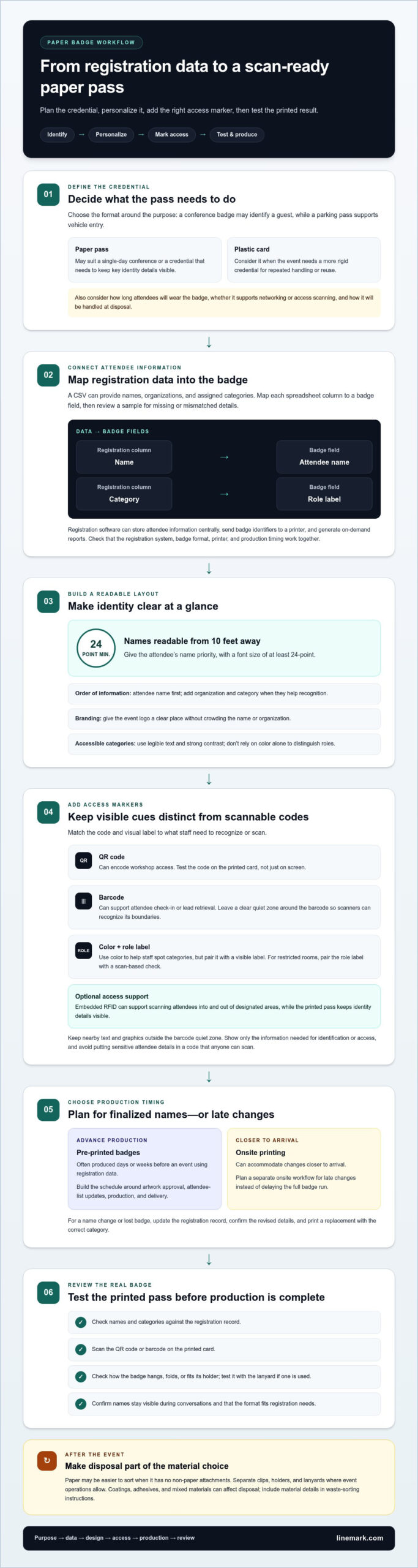
A CSV upload can provide attendee names, organizations, and assigned categories for personalized passes. Map each spreadsheet column to a badge field, then review a sample for missing or mismatched details before printing.
Registration software can store attendee information centrally, send badge identifiers to a printer, and generate on-demand reports. Pre-printed badges are often produced days or weeks before an event; onsite printing can accommodate changes closer to arrival.
For trade shows, templates can distinguish guests, exhibitors, speakers, and staff. Use category fields to select the right template, then compare each attendee’s category with the registration record. This keeps visible identification consistent with the event’s security process.
The right event badge printer and software combination depends on registration-system compatibility, badge format, and whether production happens in advance or onsite. Look for a workflow that imports attendee data, maps fields clearly, and sends the right record to the printer.
In the United States, options include event-registration platforms with badge output, dedicated event-printing providers, and commercial printers. Choose based on whether you need connected registration data, onsite production, or pre-printed credentials.
Branding and Attendee Information
Build a template that gives the event logo a clear place without crowding the attendee’s name or organization. Names should be readable from 10 feet away, with fonts at least 24-point in size.
Put the most useful identification first, such as the attendee’s name, then add an organization and category if they aid recognition. A lanyard can keep the credential visible, and a simple layout helps guests and staff find key details quickly.
For accessibility, use legible text and strong contrast, and don’t rely on color alone to distinguish categories. For a name change or lost badge, update the registration record, confirm the revised details, and print a replacement credential with the correct category.
How about printing on paper cards for your event?
Paper cards can be worn as badges, while “event pass” can also mean a parking hangtag or digital ticket. Decide what the credential must authorize before choosing its format: a conference badge may identify a guest, while a parking pass supports vehicle entry.
For in-house badge production, create a custom template, connect registration data to a printer, and test a sample scan. Add a QR code or barcode for check-in, then assign colors or labels to roles such as attendee, speaker, and exhibitor. Keep the visual cue distinct from the scannable code.
QR codes can encode workshop access, while barcodes can support attendee check-in or lead retrieval. According to GS1 guidance, leave a clear quiet zone around each barcode so scanners can recognize its boundaries. Test codes on the printed card, not just on screen, and keep nearby text or graphics outside that zone.
Color coding helps staff spot access categories at a glance, but it shouldn’t be the only control. Pair a visible role label with a scan-based check for restricted rooms. Embedded RFID can also support scanning attendees into and out of designated areas, while printed passes keep key identity details visible.
Security and privacy depend on what a credential displays and how its code is used. Show only the information needed for identification or access, and avoid putting sensitive attendee details in a code that anyone can scan. Limit access to registration data, and update the record before replacing a lost badge.
For paper pieces that need consistent branding across an event, commercial printing support can help coordinate the printed materials. Keep the badge layout focused: event identity, attendee role, and the access marker should each have a clear place.
What materials are available for your event passes?
Choose badge material based on how attendees will use it, how long they’ll wear it, and how the event handles disposal. A paper pass may suit a single-day conference, while a plastic card may work for repeated use or a credential attendees keep. The format also depends on whether the pass supports networking, identification, or access scanning.
For a personalized paper badge, plan space for the attendee’s name, organization, and event details. Add a holder or lanyard if the distribution setup calls for one. For a plastic card, consider whether the event needs a more rigid credential for repeated handling. Either way, keep the text legible and leave room for a barcode or QR code.
Recyclable options take planning. Paper may be easier to sort when it has no non-paper attachments, so separate clips, holders, and lanyards where event operations allow. Coatings, adhesives, and mixed materials can affect disposal. Include material details in the event’s waste-sorting instructions rather than assuming every badge belongs in the same bin.
Order timing depends on whether names are finalized before production or may change onsite. Pre-printed badges are produced days or weeks before the event using registration data. Build the schedule around artwork approval, attendee-list updates, production, and delivery. For late changes, plan a separate onsite printing workflow instead of delaying the full badge run.
Before approving a sample, check how it hangs, folds, or fits its holder. Test a printed badge with its lanyard and scan any access code. This practical review shows whether names stay visible during conversations and whether the format suits the event’s registration needs. Balance durability, legible identification, and end-of-event handling when choosing material.
Printed badges versus mobile credentials and self-service kiosks
Printed badges show names and event roles without requiring someone to open a device. Mobile credentials reduce reliance on physical passes, while kiosks let attendees retrieve printed credentials themselves. For a custom event, decide whether registration should prioritize speed, visible identification, or a digital-first experience. Seamless check-in is just one component of overall event execution, and organizers coordinating broader technical solutions for live and hybrid environments can look to straightst.com to support their production needs.
A kiosk workflow needs an input device, such as a tablet, and an output device, such as a thermal or color badge printer. Self-service works for attendees who can check in independently. A staffed desk can handle exceptions, name changes, or guests who need help. Combining both lets teams keep routine check-ins moving while resolving individual issues.
On-demand printing can reduce check-in wait times by 60-70% compared with searching through pre-printed badges. That difference depends on the workflow: attendees need to find their record, and the system must send it to the printer. A corporate conference using 175 pre-printed badges may prefer advance preparation, while late registration changes favor printing credentials as needed.
Mobile credentials can reduce the need to distribute physical passes, but printed badges remain useful when sponsors, staff, or attendees need visible names and roles. Colors can distinguish groups, and a clear print keeps essential details easy to see. A trade show could pair digital entry credentials with printed exhibitor badges, using scans at access points and visible identification on the floor. Companies looking to reinforce staff visibility alongside badges can also turn to custom t-shirt printing Dallas for business to ensure their on-site team is easy to spot.
Choose a format by mapping arrival, access checks, and exceptions. Use mobile credentials where digital entry suits the attendee flow; add kiosks for self-service printing or staff a registration desk for personal support. A hybrid plan can accommodate different preferences without requiring every guest to use the same check-in method.
If your event also needs a printed guide, explore custom book printing as a companion to its credential system.
Linemark: Custom Book Printing
Linemark supports event communications with custom book printing, direct mail, large format graphics, and commercial printing. If attendees need more than a badge, a printed conference guide or program can bring schedules, speaker details, and venue information together in one useful piece.
Custom book printing suits projects that call for a bound, easy-to-carry resource. Direct mail can support pre-event communications, while large format graphics can present event information across a venue. These materials complement a credential system without replacing the registration and access tools you’ve chosen.
Bring event materials together around the attendee journey: what guests receive before arrival, carry onsite, and use to find their way. Contact Linemark to discuss printed materials that support your event.
Make your event communications work as one
Plan each attendee touchpoint as part of a connected experience. A thoughtful event credential and badge printing plan can align access information with broader event communications, giving each printed piece a clear role. Decide which details belong on the pass and which belong in supporting materials, then keep them consistent throughout the event.
Before production, assign responsibility for attendee data, design approvals, and updates. A clear process helps teams manage changes without creating conflicting versions. It also gives staff a shared reference for registration questions and consistent information across materials.
Linemark offers Custom Book Printing, Direct Mail, and Large Format Graphics to support event communications beyond the badge itself. If you’re planning printed materials for an upcoming event, contact Linemark about event printing. A coordinated plan gives your team a practical starting point for a confident attendee experience.
Frequently Asked Questions
What are event credentials?
Event credentials identify a person and can indicate which parts of an event they’re authorized to access. They may be physical, such as a worn badge, or digital, such as a ticket on a mobile device. Organizers can use credentials to distinguish a speaker from a general attendee and direct each person to the appropriate sessions or areas.
What information should be printed on an event badge?
Print the details staff and attendees need to recognize someone and understand their role. A name and organization may be enough for a networking event; a conference with controlled sessions may also need a role or access category. Keep personal contact details off the visible badge unless they serve a clear event purpose, and ensure the printed information matches registration records.
What is the difference between an event badge and an event pass?
An event badge is generally worn as identification, while an event pass can describe other forms of admission or access. For example, a badge might identify an exhibitor on the show floor, while a parking hangtag serves as a vehicle credential. A digital ticket can function as an event pass without being a wearable badge.
What is event credential and badge printing?
Event credential and badge printing is the process of producing attendee identification and access materials from event details. It can include preparing a design, matching attendee records to badge fields, producing credentials, and checking names and access markers. Organizers can prepare badges in advance or print credentials as registration information arrives.
What information should event badges include?
Start with the attendee’s name, then add only details that help people navigate the event or staff manage entry. An organization name can support introductions, while a role label can identify a speaker, sponsor, or guest. For controlled sessions, include a relevant access marker. Keep the layout uncluttered so the most useful details are easy to spot.
What badge sizes, materials, and printing options are available?
Common event formats include 4 x 3-inch badges and 3-3/4 x 5-1/2-inch badges. Paper credentials can suit temporary event use, while plastic ID cards provide another format to consider. Printing options include thermal output and color printing. Choose the size according to the information and access markers displayed, then match the material to how attendees will carry or wear it.