


 11/10/2026
 Steve Bearden
A patient statement carries protected health information through printing, handling, and delivery. HIPAA-compliant printing and mailing means protecting that information throughout the workflow with appropriate safeguards and a Business Associate Agreement when a vendor handles it on a healthcare organization’s behalf.
Protecting a finished statement is only part of the job. File transfers, production access, document matching, and mailing procedures all matter. This article explains what HIPAA-compliant printing involves, how vendors can safeguard patient information, when a Business Associate Agreement is needed, and how statements move from print production to the mailbox. You’ll get a clear view of the controls that support a secure, accurate process.
Key Takeaways
- Map how patient information moves from file transfer through production and mailing to identify where safeguards matter.
- Determine whether a print vendor handles protected health information on your organization’s behalf and needs a Business Associate Agreement.
- Look for a controlled statement workflow that supports accurate document matching and traceability.
- Understand how direct mail can support patient statement delivery as part of a coordinated print operation.
Encryption and production-facility access controls
Protect patient billing files before, during, and after production. A secure workflow combines controlled data transfer, encrypted storage, and restricted access to the facility.
Secure Data Transfer and Storage
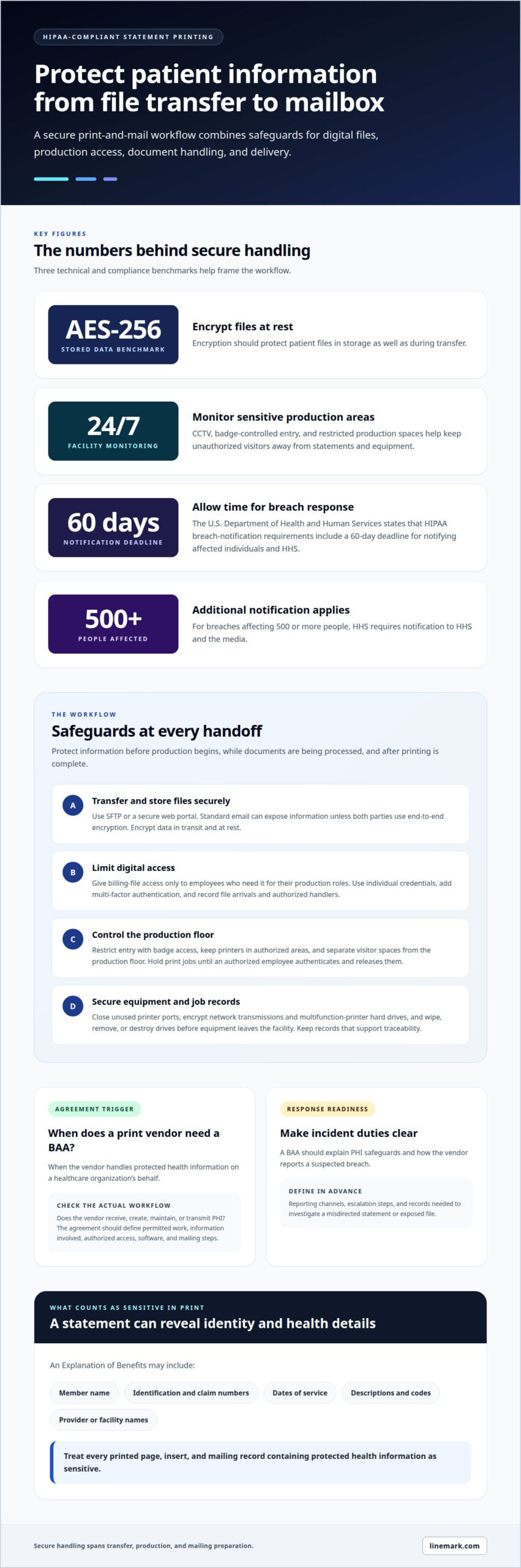
Use SFTP or a secure web portal to transfer patient data to a print provider. Standard email can expose information unless both parties use end-to-end encryption. Encryption should protect files in transit and at rest; AES-256 is a stated benchmark for stored data. These controls matter from the moment an associate sends a statement file until its production run is complete.
Access controls matter throughout the digital workflow. Limit billing-file access to employees who need it for their production roles, and use individual credentials rather than shared accounts. Multi-factor authentication adds another checkpoint for systems containing patient information. Keep a record of when each file arrives and which authorized users handle it.
Print Facility Access Controls
Physical safeguards keep unauthorized visitors away from patient statements and production equipment. A facility can use badge access to restrict entry and 24/7 CCTV to monitor sensitive production areas. Printers should sit in spaces limited to authorized employees, not public walkways. These measures reduce casual exposure during setup, printing, finishing, and mail preparation.
Controlled print release adds another safeguard: documents stay on hold until an authorized employee authenticates and releases them at the printer. This helps prevent patient pages from sitting unattended in an output tray. Defined access zones can also separate visitor areas from the production floor where billing statements are processed.
Networked equipment needs attention, too. Healthcare organizations can secure printers by closing unused ports and encrypting data sent across the network. Encrypt multifunction printer hard drives, and wipe, remove, or destroy them before a device leaves the facility. These steps address information that could remain after an active print job ends.
Apply safeguards throughout the job lifecycle. A provider can receive files through SFTP, restrict access to assigned production employees, and secure the equipment used for each run. Pair these digital measures with badge-controlled areas and monitored entry points. Together, digital and physical safeguards help protect patient information from secure storage through printing and mailing preparation.
Does my print vendor need to sign a Business Associate Agreement?
A print vendor needs a Business Associate Agreement (BAA) when it handles protected health information on a healthcare organization’s behalf. A misaddressed envelope can expose patient data, trigger breach-response duties, and create liability for a Business Associate.
Business Associate Agreement Applicability
Ask whether the vendor receives, creates, maintains, or transmits protected health information while working for an organization. A statement printer processing patient names, account details, or billing documents for a healthcare organization may have this role. A BAA sets the terms for the relationship and clarifies responsibilities before files enter production.
Check the agreement’s scope against the actual workflow. It should identify the permitted work, the information involved, and which employees or associates may access it. Include the software and mailing steps that handle patient data, not just the pressroom. This gives both organizations a defined process for handling documents and responding to incidents.
PHI Safeguards and Breach Notification
A BAA should explain how the vendor protects PHI and reports a suspected breach to the healthcare organization. Specify reporting channels, escalation steps, and the records needed to investigate a misdirected statement or exposed file. Clear procedures help the organizations coordinate quickly and identify who needs to act.
The U.S. Department of Health and Human Services states that HIPAA breach notification requirements include a 60-day deadline for notifying affected individuals and HHS. For breaches affecting 500 or more people, the U.S. Department of Health and Human Services requires notification to HHS and the media. The BAA should support timely information sharing so the covered organization can meet applicable duties.
Breach Risks and Penalties
What are the risks and penalties for a HIPAA breach involving mailed documents? Exposed records can compromise patient privacy, prompt required notifications, and lead to financial penalties or other legal consequences. Business Associates can also be liable when their actions cause a breach that puts PHI privacy or security at risk.
For example, a statement inserted into the wrong envelope may reveal names, account details, or care information to an unintended recipient. A documented response process should identify affected mailings, preserve relevant production records, and promptly notify the healthcare organization. For statement production needs, explore commercial printing as part of a coordinated print workflow.
What Is HIPAA-Compliant Printing?
HIPAA-compliant printing applies safeguards to protected health information across printed healthcare communications. Every stage, from preparing a patient file to mailing the document, needs a controlled process.
Protected Health Information in Print
Explanation of Benefits statements can include a member’s name, identification and claim numbers, dates of service, descriptions and codes, and provider or facility names. Together, these details can identify a patient and reveal health information. Treat every printed page, insert, and mailing record containing protected health information as sensitive.
HIPAA applies nationwide to print and mail services that handle this information. Start a practical review by identifying the fields on each document and who can access them during production.
Healthcare Billing and Patient Communications
Healthcare organizations use printed communications for billing statements, notices, and insurance-related explanations. The content varies, but account details or service information can make even a routine billing document sensitive. Include only the data fields needed for the communication’s purpose.
In-house printing keeps production within the organization, while outsourcing assigns printing and mailing to a provider. Both approaches require appropriate safeguards. A vendor handling protected health information on an organization’s behalf may be a Business Associate.
Outsourcing Patient Statements and Notices
To outsource statements, define the document types and data fields, establish a Business Associate Agreement where applicable, and set out file-handling and production steps. Send approved job data through a secure channel, process the mailing, and retain job records. Written policies, employee training, and risk assessments support the workflow.
Oversee partners by reviewing their security practices and how they document each mailing. An audit trail should make it possible to trace each letter and investigate an error or vulnerability.
Privacy in Addressing and Tracking Mail
Use the recipient data assigned to each record, then match every document to its intended envelope. A mismatch can expose information to the wrong person. An audit trail linking each letter to its production record helps locate affected mail if an error occurs.
Package completed mailings to prevent exposure during handling, and retain records of processing and dispatch. For each mailing, confirm that document matching, envelope preparation, and job records follow the organization’s defined privacy process.
HIPAA-compliant patient statement printing and mailing
A patient statement workflow connects billing data, document production, matching, and mailing. Clear controls at each handoff help protect information and support accurate delivery.
Start with the source file. Map its fields to the statement template, including patient identifiers, balances, and mailing addresses. Before production, confirm that the billing software export matches the required format. A test file can reveal missing fields, misplaced data, or incompatible layouts before the full run begins.
Revenue-cycle communications often include statements, payment notices, and follow-up mailings. Each document should use only the information needed for its purpose, with production records linked to the relevant job. For retention or recall mailings, define which patient group receives the communication and keep audience selection separate from statement data.
During print and mail production, 2D barcodes can identify addressees and group pieces for accurate insertion. An integrity camera can photograph an assembled mailing piece for validation. These checks help connect the printed statement with its intended envelope, reducing the risk of a mismatch during a high-volume run.
Mailing services may provide a secure portal with daily job-received confirmations and tracking capabilities. Use those records to follow a job from file receipt through processing and dispatch. A traceable job history also helps teams investigate a returned statement, identify an affected mailing, or arrange a corrected communication.
Set protocols before launch: agree on file structure, matching logic, review steps, exception handling, and job reporting. The provider can then flag records that fail validation rather than sending incomplete statements into production. Digital file preparation and documented controls make recurring billing communications more consistent from one statement cycle to the next.
For a coordinated patient statement workflow, plan your print and mail project.
Linemark: Direct Mail
Linemark’s Direct Mail service supports organizations that need to produce and distribute printed communications, including patient statements. It can be a useful fit when your team is planning a mailing workflow and has defined the information, safeguards, and responsibilities involved.
Before a patient statement project begins, align the data format, document design, recipient matching, and mailing steps. If the work involves protected health information, establish the appropriate Business Associate Agreement and safeguards for the workflow. Clear specifications connect billing requirements with production and delivery, while keeping responsibilities clear across the project.
Direct Mail can also support other coordinated communications. Commercial Printing, Digital Printing, and Variable Data Printing address different production needs. Choose an approach based on the materials, data, and process your organization is preparing.
Contact Linemark to discuss your print and mail project.
Plan Your Next Patient Mailing
Turn your privacy requirements into a defined production brief. Identify the statement formats, recipient data, mailing schedule, and safeguards your organization expects. This gives the print workflow a clear operational framework before files enter production.
HIPAA-compliant printing and mailing depends on coordinated decisions about data handling, document production, and delivery. Linemark’s Direct Mail service supports organizations planning printed communications, while Custom Book Printing and Large Format Graphics serve other print needs. Start by outlining your materials and intended workflow to focus the discussion on your project.
Use that conversation to align the mailing scope with your organization’s requirements and determine the next production steps. A well-defined brief helps everyone work from the same plan, from file preparation through final mailing. Discuss your mailing project with Linemark and move your next communication forward with a clear plan.
Frequently Asked Questions
What mail class must healthcare PHI be sent through?
HIPAA-focused mail handling is about protecting patient information, not choosing a particular class of postage. Select a mail service that suits the organization’s delivery and tracking needs, then apply privacy safeguards during preparation and dispatch. Handle the statement envelope and recipient details so people without a work-related need cannot access the contents.
What makes a printing and mailing service HIPAA compliant?
A service handling protected health information needs safeguards for the data it processes and clear procedures for responding to incidents. Compliance depends on how the provider actually handles patient data, not on a label alone. Review written policies, employee training, risk-assessment practices, and whether job records can help trace a mailed document if an issue arises.
What HIPAA rules apply to printing and mailing protected health information?
HIPAA’s privacy and security requirements apply when printing or mailing involves protected health information. Relevant safeguards include administrative, physical, and technical protections. For a statement workflow, consider who can access patient details, how production equipment is secured, and how electronic data is protected. Vendor arrangements should also address breach-response responsibilities.
Do print and mail vendors need a HIPAA business associate agreement?
A print and mail vendor generally needs a Business Associate Agreement when it handles protected health information on a healthcare organization’s behalf. The agreement should reflect the work, information, and processes involved. For example, if a vendor prepares patient billing statements using identifiable data, the agreement should address its role in protecting that information and reporting suspected incidents.
How should healthcare organizations vet a HIPAA-compliant print and mail vendor?
Assess a vendor’s documented safeguards and how they operate in practice. Review its written policies, employee training, risk assessments, incident procedures, and ability to trace individual mailings. SOC 2 Type II can serve as a security benchmark, while alignment with the NIST Cybersecurity Framework is another useful consideration. Treat these as evaluation inputs, not substitutes for understanding the vendor’s specific workflow.
What security safeguards should HIPAA-compliant printing and mailing services provide?
Safeguards should cover digital files, production operations, and paper materials. Look for protected data transfers, encrypted storage, access limited to employees with a work-related need, and controlled entry to production areas. Mailing controls should match each statement with its intended recipient and support an investigation if a job contains an error. Fit safeguards to the information and steps in the specific workflow.